AI-powered web assistant
About DAiSY
A smart new way to find trusted info fast


DAiSY is our AI-powered website assistant, designed to make it easier to find the information you need from across the DairyNZ website. DAiSY can quickly access trusted answers from our extensive online knowledge base - so you spend less time searching and more time getting things done.
Scroll down to learn more about how DAiSY works or click here to try asking DAiSY a question.
DAiSY simplifies your search for information by giving you summarised answers to your questions – fast. It’s an intuitive AI-powered tool that understands natural language and responds using content only from our website. That means you can trust the source and get helpful, credible answers quickly, with direct links to the most relevant resources.
Drawing from over 1,100 pages of trusted information and 880 practical tools and resources, DAiSY taps into DairyNZ’s extensive library of science-backed, proven farm systems research. DAiSY tailors answers to your specific questions, helping you apply the knowledge you’ve invested in, directly to your farm business.
It’s a smarter, faster way to turn research into results.
You’ll find DAiSY on our website by clicking the search box in the top centre of your screen (desktop) or top right (mobile).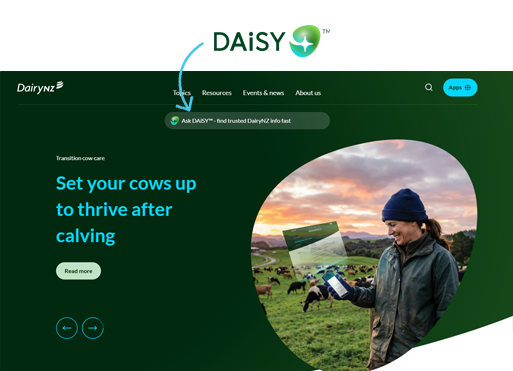
Simply type your question into the chat box – just as you would when asking a person, and click the send button.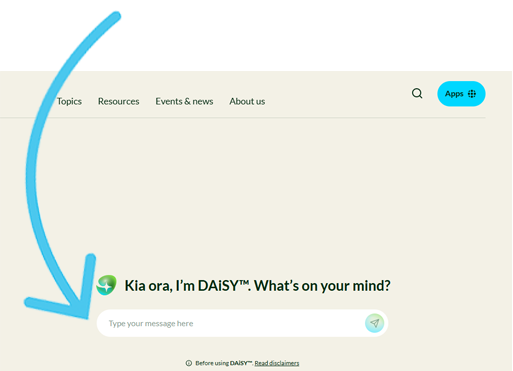
Ask DAiSY a question about what you’re dealing with on-farm right now – or try one of these:
DAiSY works best when you ask questions the same way you’d talk them through with someone who knows dairy farming. The more context you give, the more useful the answer will be. Here are a few simple ways to get the most out of DAiSY:
You can create a quick-access shortcut for the DAiSY page directly on your phone’s home screen so it is always just one tap away.
For iPhone/iPad
For Android
You will now see a shortcut icon on your home screen to open the page instantly.
DAiSY quickly retrieves information from across our website. For example, DAiSY can help to:
Every answer includes references to relevant web content, with clear highlights showing where the information came from, so you can explore further if you like, or ask DAiSY another, more specific question.
DAiSY isn’t a replacement for expert advice. It can’t provide fully personalised recommendations or replace conversations with your vet, farm advisor, or other rural professionals. Instead, it complements these sources by making trusted information easier to access.
DAiSY is always learning. Rate the answer you got by using the thumbs up/down buttons at the bottom of DAiSY’s answer, or let us know if there’s something DAiSY could improve by completing the form below:
Explore the links below to find out how many ways you can connect with DairyNZ, read our website terms of use and check out our privacy notice.
Now’s the perfect time to check in, plan, and set up for a strong season. We’ve pulled together smart tips and tools to help you stay ahead all winter long.
Whether you prefer to read, listen, or download handy guides, we’ve got you covered with trusted tools to support your journey every step of the way.
Put our proven strategies and seasonal tools to work. Boost production, support animal health and watch your profits hum.
Tools that are backed by science, shaped by farmers and made for this season.
That’s Summer Smarts.
Autumn Smarts brings together the research-backed tools that build resilience and boost performance.
The tools and insights you need to navigate the season with confidence. Backed by research and built for results – that’s Winter Smarts.